Posts

Have You Heard About HyperDocs?

Image
HyperDocs  Lately, I am obsessed with HyperDocs. Have you heard about them?  HyperDocs are a transformative way to deliver an interactive lesson to your students that incorporates engaging and meaningful technologies.  What is a HyperDoc? Think of a HyperDoc like a digital lesson that offers students a personal experience which involves them in the learning throughout the entire process by incorporating various multi medias, creative activities and interesting websites.   Image Source HyperDocs come in many forms such as a Google Presentation, a Google Map and most commonly, a Google Doc with colorful tables built in. Perhaps a better way to explain a HyperDoc is to show you an example of one.  Click here to see a HyperDoc on Electricity.   Notice how the lesson is designed to access prior knowledge, build the concepts, provide student reflection, assess learning and all of the necessary components of a properly prepared...

Making of a High School Makerspace

Image
Our Makerspace - The Liftoff Planning: We've been planning for a makerspace in our high school for over two years. During that time we introduced ideas and gave students a small taste of what was to come. Showcasing some tech on a table outside of our office to initiate interest and exposure. Implementing: This year we kicked off the official space and it is definitely a work in progress with challenges and successes. Here is the space before we began. We started with limited furniture, limited supplies and a blank canvas.  To prepare the makerspace, I gathered some tech, went shopping for supplies, up-cycled some furniture and made a plan. Stations: With the help of my co-worker, Jeremy, we assembled 6 stations throughout the makerspace. #1 A Green Screen Photo Booth Station with some green screen backgrounds   #2 A Hack Your Chromebook Name Tag Station #3 Virtual Reality Headset Station #4 An ...

Buncee Can Be Used in Many Ways - Presentations, Blended Learning or a Student Showcase

Image
Buncee is a Great Site I learned About This Past Summer If you are an educator I recommend going to edu.buncee.com  This is a free site that allows you to create a slideshow type presentation, but also can be used to blend learning for a lesson or even as a student portfolio or showcase. Your students will enjoy creating content with Buncee as well. When you first open a Buncee you are able to choose a background  from their gallery, from the web or upload an image of your own. Next you can choose from many different types of media to add objects to your page. Once your page is created you can add additional pages and view your Buncee in preview mode whenever you want. I love all of the options for adding media to your pages. The animations, drawings, videos, and stickers make your slides visually appealing. One of the richest types of media you can add is a 360 degree image from Buncee's gallery. These images allow the audience to click and scroll to ...

Friday Fun - Instant Creativity

Image
Are you looking to make money? Yes? Then I have a deal for you! Let me explain. Festisite is a site that lets you do all sorts of fun and unique things including making money with your picture on it. When you go to the site, click on Instant Creativity.   From there you will have many choices of what to create. Money, money, money Uncle Sam Queen of Hearts Wordle Minecraft GIFS Festisite  has been so much fun to explore and create with.  I highly recommend using  Festisite   to promote digital content creation.  Share this site with your students and colleagues. Enjoy!

Teaching Generation Z

Image
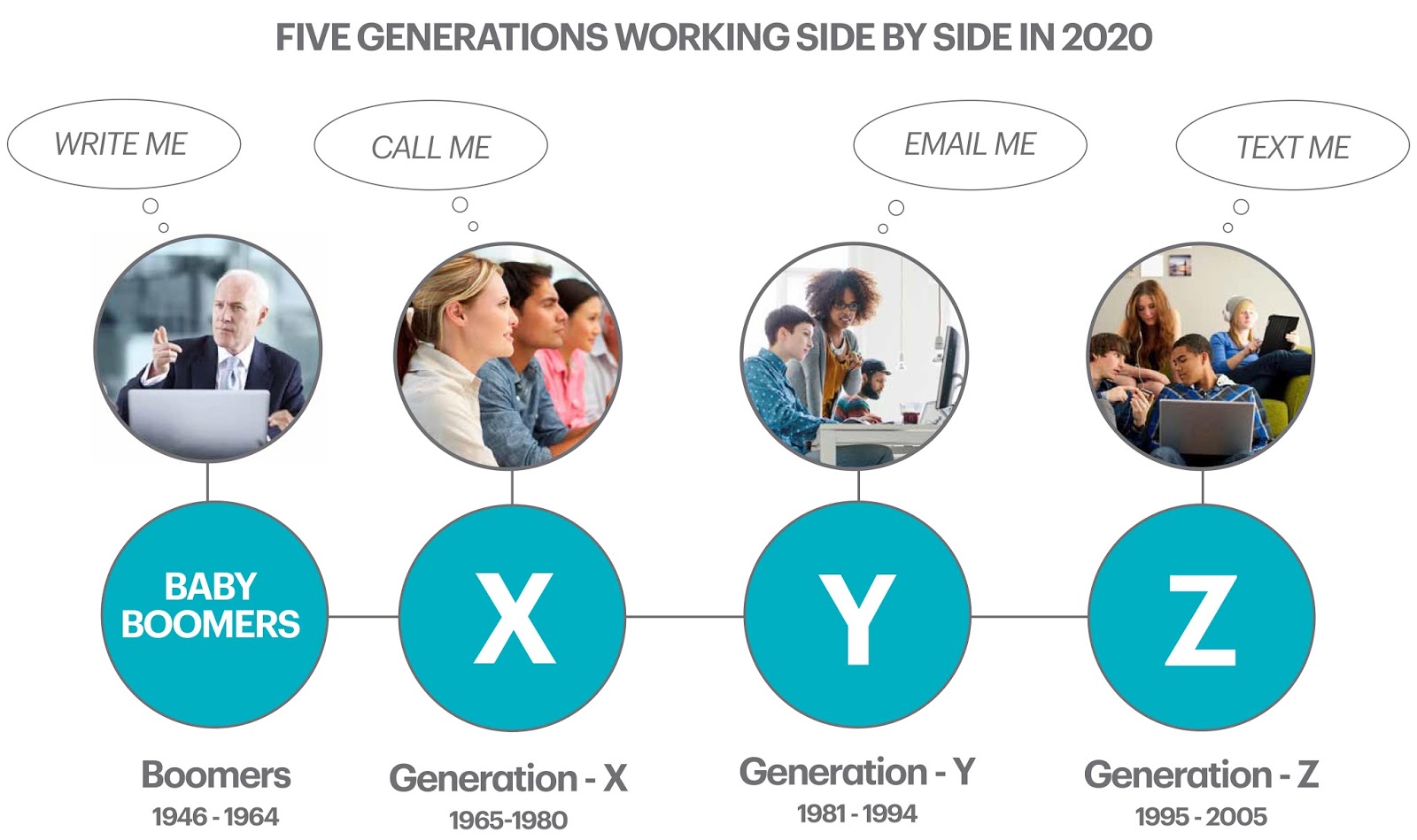
Generation Z were born between 1995 and 2015.  They range from 1 year old to 21 years old.  In other words, the students we teach in school today are Generation Z.  Generation Y, also known as Millennials, range from 21 to 41 years old and represent much of our workforce today. I know what you're thinking. What will be the next Generation? What comes after Z? I did a little research and found out that the next generation might possibly be called Generation Alpha. I found this information by reading this article and here is a graphic from the site.  Let's take a look at a few facts about Generation Z. They have never known a world without Internet and cell phones and they have little or no tolerance for being without digital resources They are tech savvy and in constant contact with people 24/7 using Facebook or Twitter They want technology that is easy to use and will solve their problems, help coordinate their activities, or provide them with relevant...

#StarbucksMyRoom

Image
Inspiration for Redesigning Your Learning Space As I have mentioned many times, I love listening to podcasts when I'm commuting.  Recently I listened to this podcast from The Cool Cat Teacher - "Do Students Learn Better in Chairs or Couches?"  In this podcast, the guest, Oskar Cymerman, talks about how he plans to Starbucks his classroom. Oskar is a  Chemistry and Principles of Engineering Teacher at Woodbury High School in the Twin Cities Metro Area, MN. After listening to the podcast, I went to Oskar's website, focus2achieve.com  and read his blogpost about redesigning his learning space. In the blog post, Oskar mentions checking out the hashtag #StarbucksMyRoom on Twitter. So I went to check it out. Ready. Set. Go School starts tomorrow. Excited! #classdesign #StarbucksMyRoom pic.twitter.com/EcJmHR1hZD — Alison Hannon (@AlisonHannon) August 14, 2016 Love flexible seating! #Kidsdeserveit #flexibleseating #StarbucksMyRoom pic.twitt...

Is Your Classroom Ready? I Have a Few Ideas for You

Image
Active Learning Spaces I heard an advertisement for back to school the other day. It suggested that no one is every ready to go back to school because summer is just too short. The message was that even though it's tough to go back to school, you can do it in style. The advertisement then went on to promote a clothing line.  "My goodness", I thought, "Gone are the days when going back to school was a positive and exciting time."  I used to get so excited about going back to school when I was younger. I looked forward to buying school supplies, to seeing my friends, to new learning opportunities and to new experiences.  But, today's students may not feel that same anticipation that I did. I know my own two high school boys don't.  Perhaps we can bring back some of the enjoyment and fun by thinking about designing our classrooms to look different from the traditional classroom and provide our students with an active learning space that fits th...

Visually Pleasing - Rock Those Google Presentations

Image
Google Presentations  Boost Your Knowledge with These Great Tips and Tricks One of the ways that I've been spending some of my precious time lately is creating Google presentations for a graduate class that I will be teaching this Fall as well as for the various trainings that I've been preparing for. Design and graphics have always interested me, so I love looking at ways to spruce up my presentations to add interesting elements that will make a visual impression on the audience.  So, today I have a video tutorial of five tips and tricks for Google Presentations that I think you will find useful and will add visually pleasing elements to your presentation. Enjoy!

I Finally Figured it Out - 360 Degree Pictures Made Easily

Image
With growing interest in Virtual Reality, Google Cardboard, Google Expeditions and Thinglink VR, I've been spending a bit of time exploring 360 degree pictures. I've been able to find images online that have been posted by other people. Even our local newspaper has a link called Virtual Reality where they post  360 degree video stories  from USA Today.  I've been really enjoying these amazing stories and views. Theta 360 degree camera For the past few weeks I've been trying to figure out a simple way to take 360 degree pictures of my own. I've seen the Theta  360 degree camera  demoed and it works really slick, but I don't want to  spend $350  for one. I asked my 16 year old son if he has ever taken a 360 degree picture and he said no, but once he looked at the examples I was exploring he went to work to find an app.  The Google Street View App  for IOS or Andriod is the one he found. And it works great!!  Leave it to a...

Summer 2016 = Learning, Experiencing, Tinkering

Image
What I'm Learning This Summer I've always been a life long learner. I crave information and I love to learn and try new things. With that said, here are some of the ways I've been growing as a learner and gaining valuable knowledge in education and technology.

Learning with Data - Chat with Deb

Image
Chat with Deb about Learning with Data -  Working with big data is a 21st Century skill that many employers are looking for. Data is all around us, and using big data to determine programs and the future of education is prevalent in education today. In this video blog, I share several great resources and sites for using with students of all ages to teach them how to find, chart, graph, analyze and interpret large data.  If you are interested in a specific tool or site, look at the timestamp below the video. Timestamp: 0:28 - Knoema - A Data Atlas for finding large data 2:13 - Create a Graph - an awesome tool for entering data to make a graph or chart 3:32 - A New Feature: Insert charts and graphs in Google Docs and Presentations 5:23 - Wolfram Alph - A Computational Search Engine - The search results are interesting and graphically displayed 7:08 - Fusion Chart - Charts made with Java Script 8:17 - Data Stories Podcast - Podcasts are my new jam ...

Have You Joined the Community of Podcast Listeners?

Image
Podcasting - a Growing Community of Listeners Online Communities = a group of people with common interests who use the Internet to communicate, work together and pursue their interests over time.  They  come in many different forms: Social Media, Professional Networks, and if we stretch the definition a bit, Podcasts!!  Podcasts can lend well to people having conversations in an online community because they make for very interesting conversations via social media or even Monday morning at the water cooler. Podcasts are becoming more and more popular and lately I've been enjoying several different podcasts during my commute to and from work. Watch this Chat with Deb to learn about some great podcasts.    To give you the authentic experience of a podcast, this Chat with Deb was created in a podcast fashion with sound effects and music. Click here for the online presentation. Here are links to the Podcasts mentioned in this Chat with ...

Sharing a Tool - And Why I'm Worried About It

Image
To Share or Not to Share An Attractive Tool for Creating Digital Worksheets Lately there is a movement not to promote tools that aren't deep in pedagogy and critical thinking. It seems that as technology integrators we are to share tools and strategies that are strong in the SAMR model or promote the most cutting edge movements in education.  Gone are the days of 60 sites in 60 minutes or Top 10 sites for creating . . . What I'm going to share today isn't cutting edge. It is at the substitution level of SAMR. I doesn't necessarily involve critical thinking, yet I really like this tool and I'm confident that teachers and students will like it as well. The site is called Wizer.me and it is used to create a digital worksheet. Wizer.me  can also be used for formative assessments. A teacher can create their own worksheet or they can explore the hundreds of already created worksheets and use them. Here is the link to a worksheet I found while browsing on ...